
Crafting Suki’s Conversational Experience
Suki is a voice-driven AI assistant used by clinicians, with the badge serving as the main entry point for all voice interactions. As we introduce new voice-powered features, the badge must better support clear, intuitive, and consistent interactions.
Currently, badge states are unclear, inconsistent across platforms, and often providing little feedback when Suki is processing, delayed, or unable to act. Low voice-command usage further shows that users struggle to discover and understand what Suki can do. Our transition to Local WWD also requires more explicit state communication.
This project aims to create a more intuitive, voice-interaction experience, ensure cross-platform consistency, support new voice features, and improve voice discoverability to create a more natural and reliable speech experience.
My Role
Led the end-to-end design process as the lead designer.
Timeline
1.5 months
Success Metrics
Growth in the number of users using voice commands.
Reduction in drop-off rates during voice interactions.
Command tips account for >30% of all voice commands used.
Background
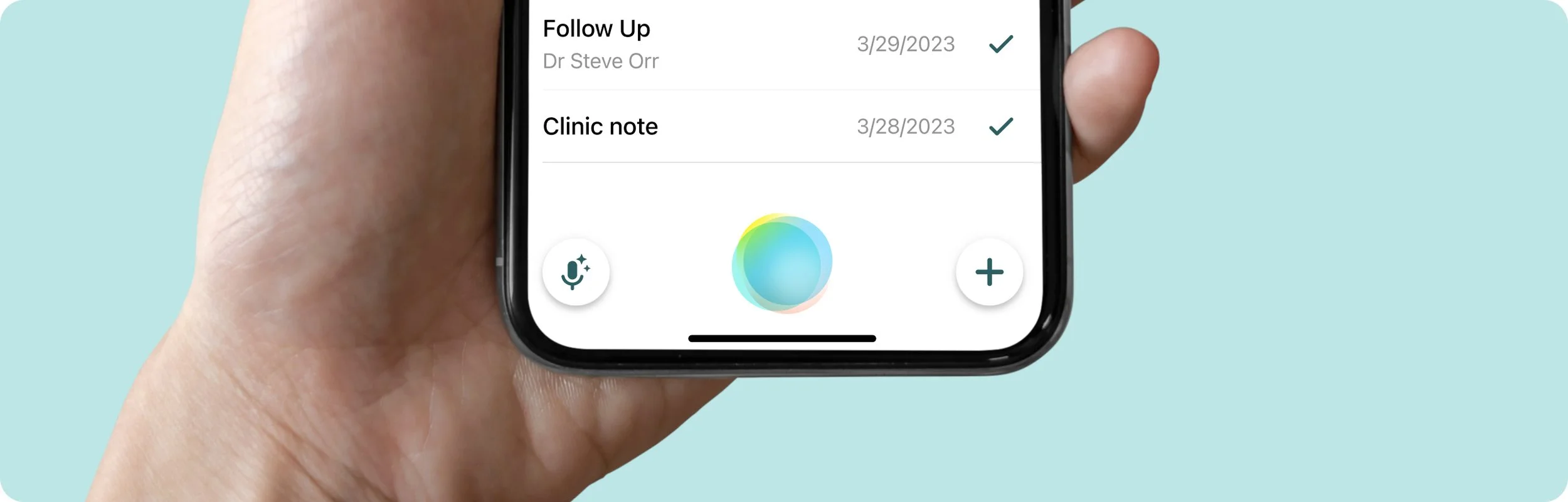
Suki is a voice-enabled AI assistant designed to reduce the administrative burden on clinicians in the US. The Suki badge serves as the primary entry point for all voice interactions, including commands, dictation, and ambient listening. As Suki expands with new voice-powered capabilities, the badge will act as the central interface for the following types of voice instructions:
Suki Commands
Short, well-defined utterances used to perform specific, predictable tasks such as script additions, in-note navigation, and content insertion.
Natural Language Edits (NL Edits)
Short to medium-length utterances that involve more complex, contextual edits within a note—for example, changing the formatting of a specific section or updating the patient’s gender.
Q&A
Utterances in which clinicians ask Suki questions about a patient or general medical knowledge.
To support these growing use cases, the badge must evolve to provide a more seamless and intuitive speech experience. This includes improving voice-command discoverability and making badge states clearer and more explicit.
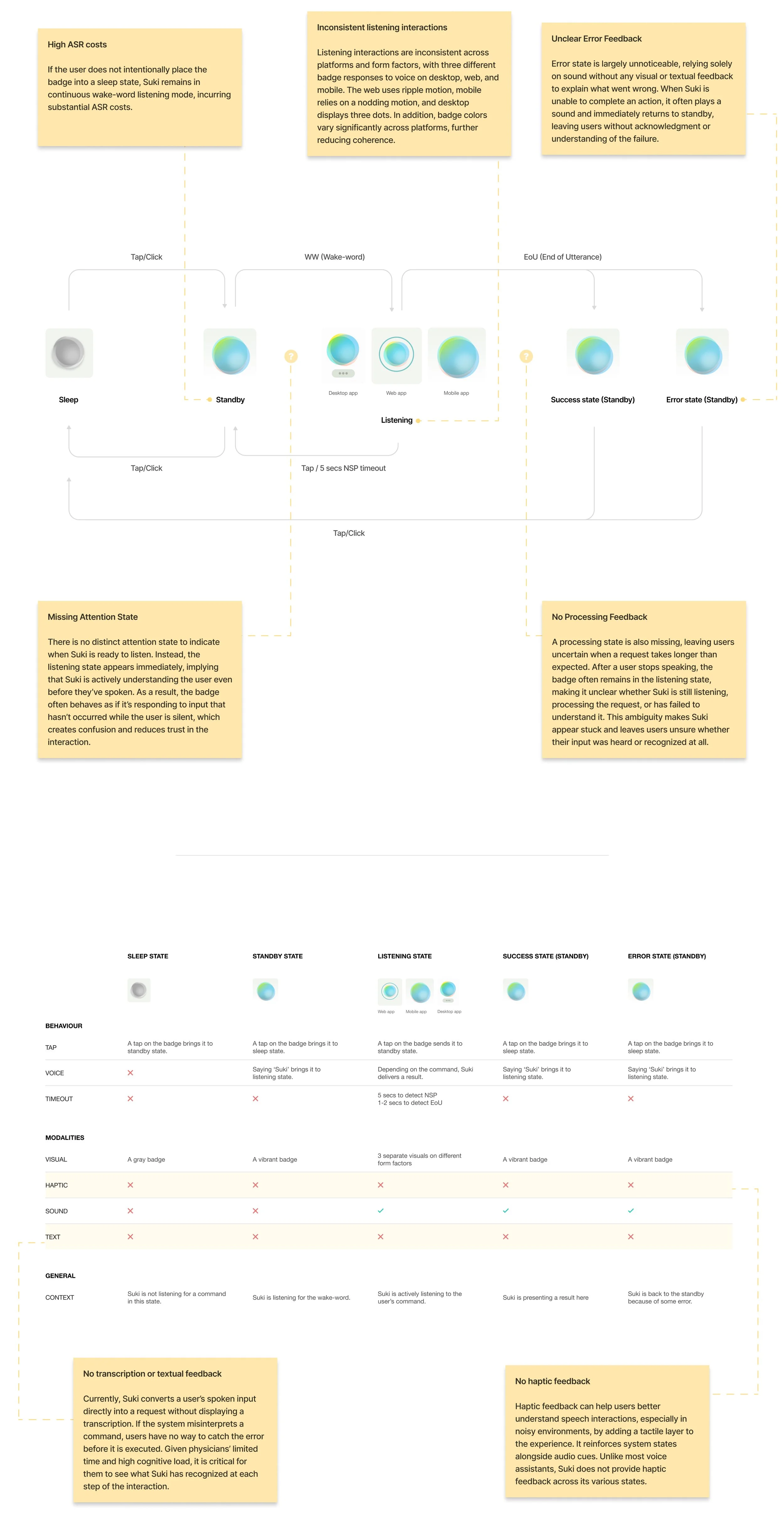
Critical gaps in the old speech experience
Unclear Interactions
The current badge interactions do not feel intuitive or natural, often leaving users uncertain about what Suki is doing or how to interact with it.
Missing Feedback and States
Several critical badge states are missing, resulting in a fragmented experience:
No indication when a request is taking longer than expected
No feedback for errors, confirmations, or unsupported actions
Delayed responses that leave users unsure whether Suki is still listening or processing
Inconsistent Cross-Platform Experience
Badge states and behaviors vary across platforms and form factors, creating inconsistency and reducing user confidence when switching between devices.
Shift to LWWD
Unexpectedly high Wake-Word Detection (WWD) costs required a transition to Local WWD (LWWD). This shift required a rethinking of how the speech experience communicates listening and activation.
Low Voice Command Discoverability
Voice command usage remains low largely because users don’t know what commands exist, when to use them, or where to find them. While commands were accessible through the “Suki, what can I say?” modal or the Help Center, this approach relied on users memorizing commands and thus creating friction and limiting adoption.
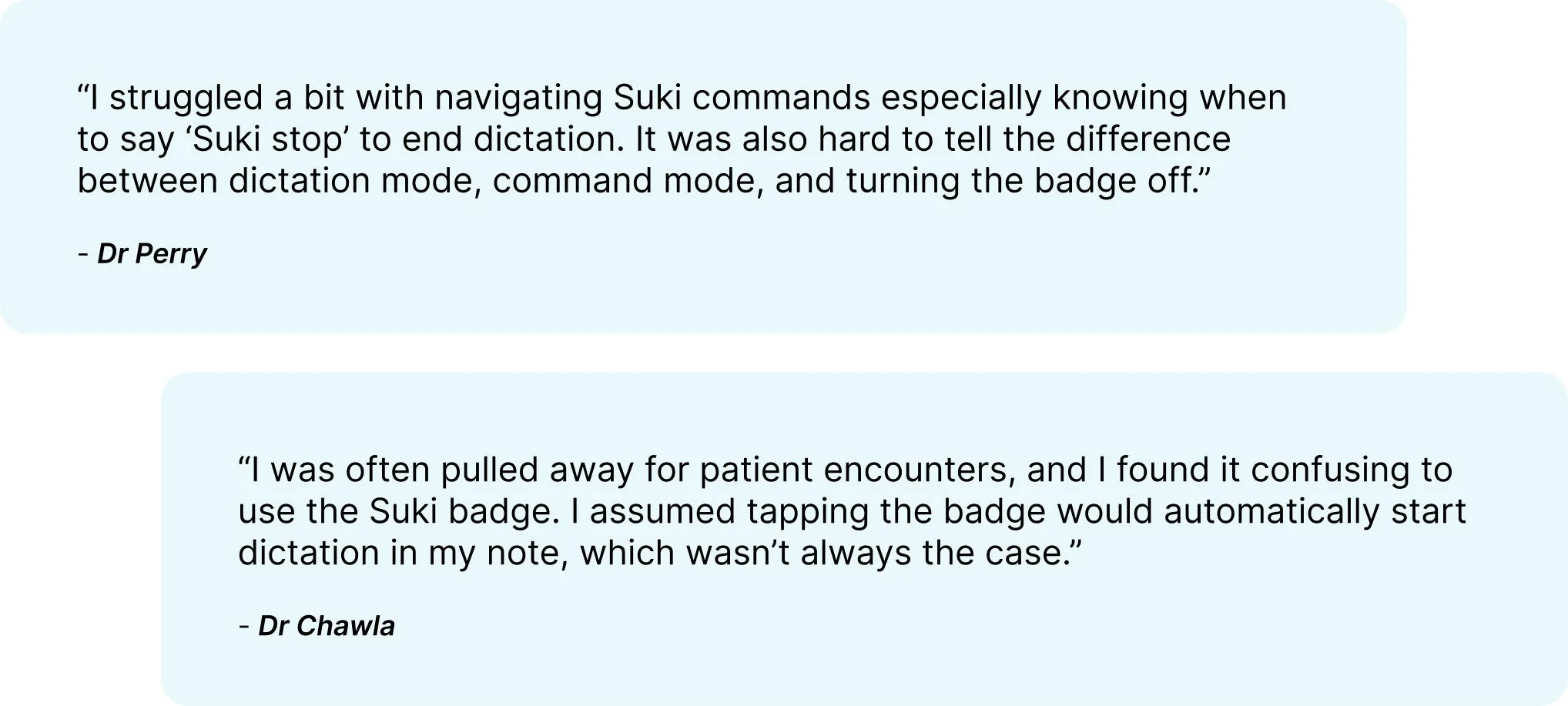
What We Heard from Users
Through multiple feedback channels, users consistently shared that the speech experience and the badge interactions in particular were confusing and difficult to understand.
Key targets for this project
With this project, we set out to create a clear, consistent voice-interaction experience that helps users confidently understand what Suki is doing, know what they can say, and adopt Suki’s voice capabilities.
Clear States and Interactions
Suki should clearly communicate its current state through well-defined badge states, including missing states such as processing and error feedback. The voice/touch interactions between these states should be self-explanatory and intuitive, leaving no ambiguity about what Suki is doing or how users should respond.
Support for LWWD and New Voice Capabilities
Evolve badge states to support the transition to Local Wake-Word Detection (LWWD) and upcoming voice-powered features such as Q&A and Natural Language Edits.
Voice Discoverability
Ensure Suki’s voice capabilities are self-discoverable, helping users easily understand what they can say, when to say it, and how to use voice effectively.
Cross-Platform Consistency
Establish consistent badge states and behaviors across platforms and form factors to create a unified and predictable experience.
Holistic Speech Experience
Design a well-rounded speech experience that works seamlessly across form factors and leverages multiple modalities like visual, motion, haptic, text and sound to reinforce clarity and confidence.
STEP 1
Examining widely adopted voice assistants to identify best practices
To inform the design of the new speech experience, I studied Designing Voice User Interfaces by Cathy Pearl and evaluated several leading voice assistants, including Siri, Google Assistant, ChatGPT and Alexa. This research helped identify industry best practices, pinpoint gaps in the Suki experience, and uncover opportunities for improvement by learning what these platforms do well.
Insights from the research
The use of Conversational Markers
Conversational markers help make an assistant feel more human by expressing basic manners and social awareness. Through acknowledgements, positive feedback, and simple assurances such as “awesome,” “thanks,” or “ahaan,” assistants mirror familiar conversational behaviors, reinforcing trust and clarity. ChatGPT, Google Assistant, and Siri consistently use these cues, while Alexa largely does not.
Visual conversational markers, in particular, are critical for communicating where users are in a conversation and whether their input is being understood. An assistant's use of basic human conversational manners such as nodding (reflected through subtle visual pulses in ChatGPT and Siri) or taking a moment to think (represented by ChatGPT’s thought cloud) serves as visual conversational markers and acknowledgements of user input. Together, these cues act as the glue that holds a voice interaction together.
Distinct Interaction States & Memorability
The more clearly distinguishable the stages or states of an interaction are, the clearer the overall experience becomes and the more likely users are to remember it over time.
This clarity is evident in assistants like Google Assistant, ChatGPT, and Siri, which have distinct states for attention, listening, and processing. In contrast, Alexa uses nearly identical states for attention and listening and lacks a clearly expressed processing state. As a result, users can be left unsure about what Alexa is currently doing.
Barge-In interaction during Latency
In graphical applications, loading states on a page communicate that the system is busy and that the user must wait before continuing. In voice interactions, the equivalent experience occurs during long processing times or unexpected latency. During these moments, you should avoid increasing user frustration by forcing them to wait unnecessarily. Allowing users to interrupt the system using voice or touch in this scenario is known as barge-in functionality. Assistants such as ChatGPT and Google Assistant support barge-in through tap during listening or processing states, while Siri does not allow barge-in at all.
End of Utterance(EoU)
Along with detecting when a user begins speaking, a good VUI must reliably recognize when the user has finished. Without this capability, users may feel uncertain about whether they were heard or understood. All four voice assistants evaluated use an End of Utterance (EoU) timeout of approximately 1 to 2 seconds; shorter timeouts risk cutting users off before they complete their command.
No Speech Detected (NSP)
Another critical timing mechanism is the No Speech Detected (NSP) timeout, which occurs when a voice assistant enters an attention or listening state but does not detect any user speech. Among all the assistants examined, NSP timeouts typically ranged from 5 to 8 seconds.
Multimodal Foundations of Speech Experiences
Well-rounded and immersive speech experiences are designed across five key modalities: visual, motion, sound or voice, haptics, and text. Most voice assistants do not rely only on speech or visuals, but instead coordinate these modalities to support understanding, feedback, and continuity throughout an interaction.
STEP 2
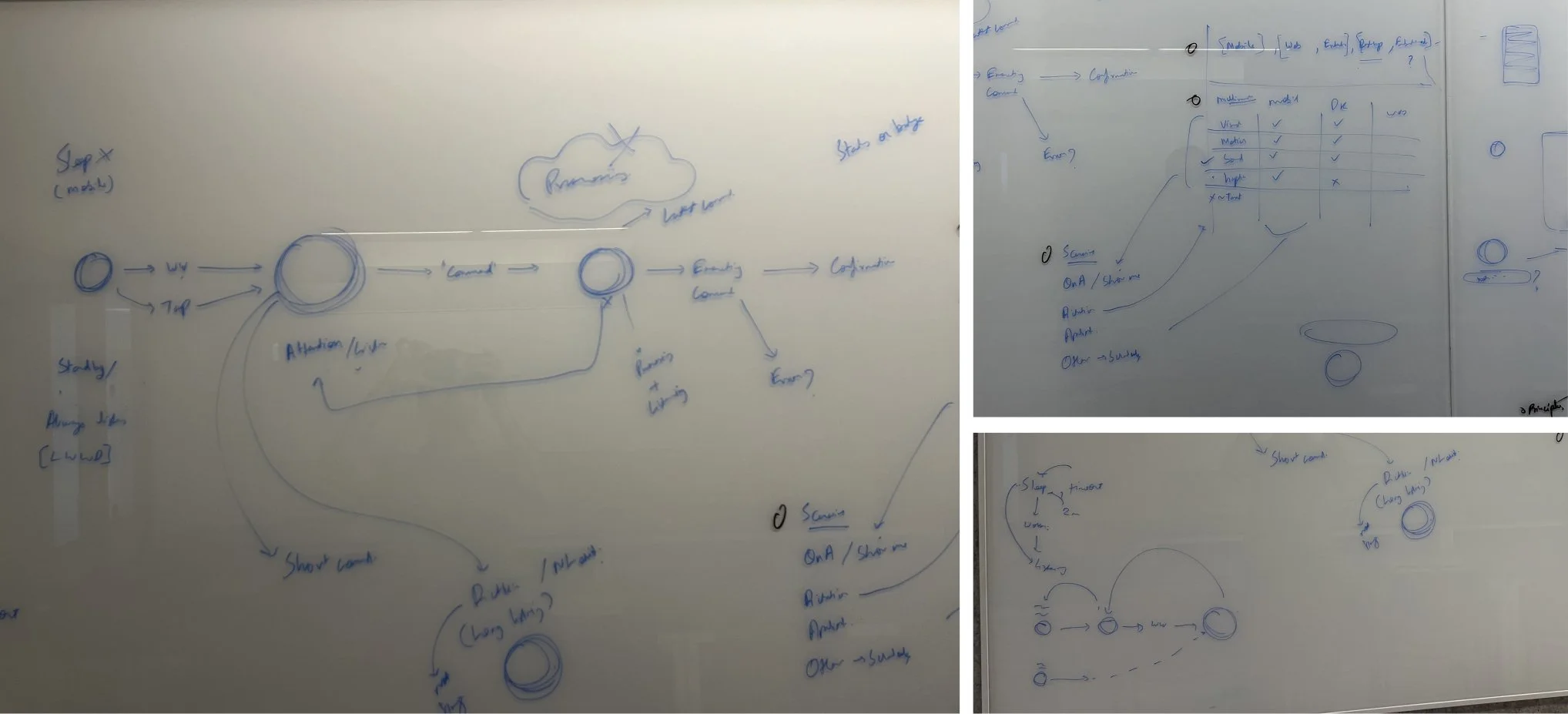
Reimagining the speech experience flow
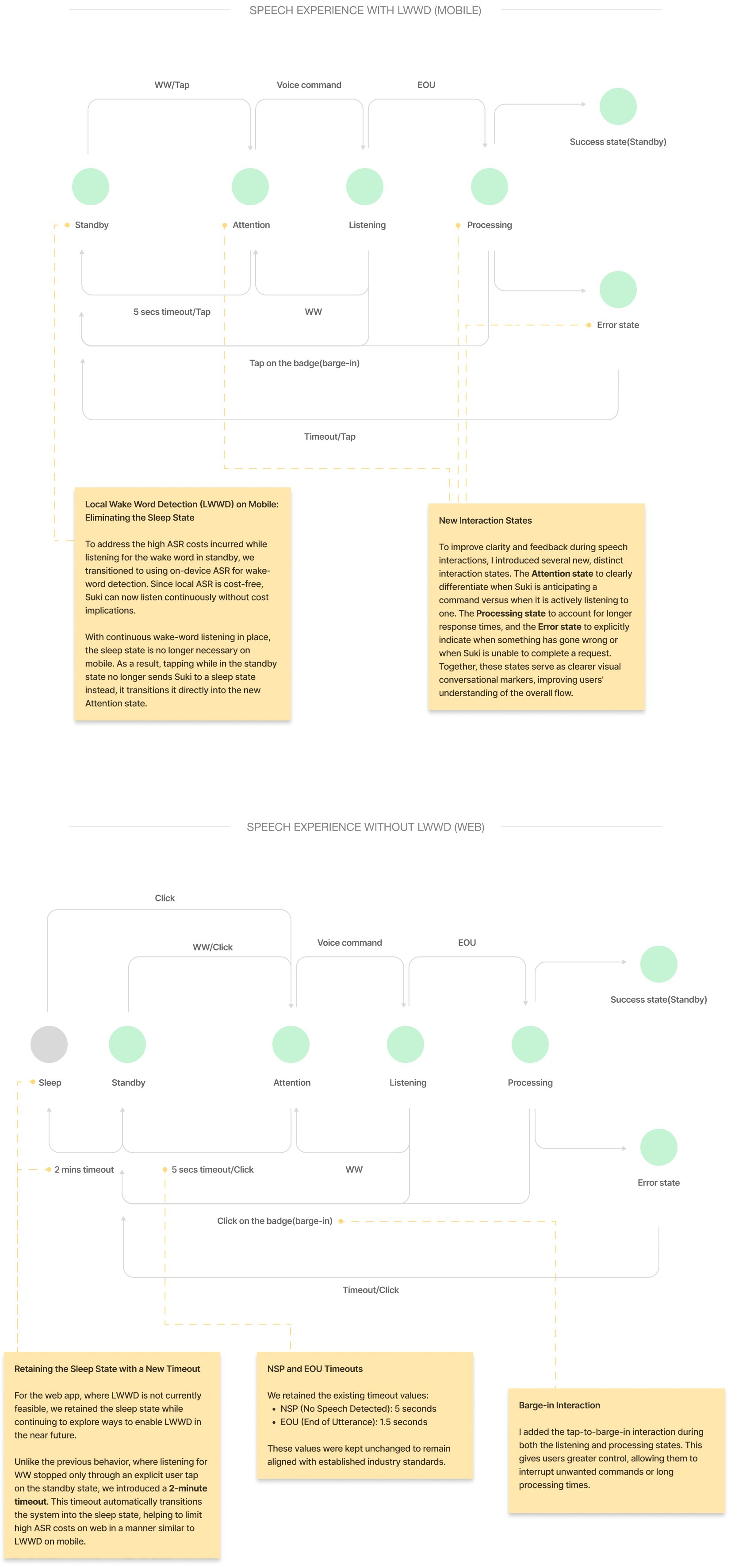
Guided by the above insights and VUX best practices, the speech experience was reimagined to address gaps in the earlier flow. Continuous wake-word listening was enabled on mobile, with refined listening behavior on web. New interaction states were introduced to signal when Suki is waiting, processing, or unable to act, and tap-to-barge-in was added to give users more control. Along with the introduction of a new timeout, the existing timeouts were retained to align with industry standards.
STEP 3
Defining Suki’s Form, Sound, and Personality Through a Multimodal Experience
After defining the new speech experience flow, I began translating it into a multimodal experience in ProtoPie, exploring multiple approaches across the five modalities - visual, motion, sound, haptics, and text.
For haptics, I used a range of low, medium, and high-intensity feedback across most states. For the error state, I used the standard default error haptic accessible on Protopie.
For sound, I curated a selection of audio files from an online sound library, balancing positive and engaging notification sounds with tones that conveyed dismissal, errors, or alerts. These curated sounds were then incorporated into the explorations.
A few of those explorations are presented below.
APPROACH 1
Keeping the badge small in standby was intended to convey that Suki is away or unavailable. When a user says “Suki,” the badge animates upward and grows in size, moving toward the user to signal that Suki now has their attention.
This interaction was inspired by microphone and Shazam-style animations. Ripples appear around the badge to indicate that the user can begin speaking and that Suki is actively listening. As the user speaks, the ripples animate in sync with the rhythm of their voice. When Suki begins processing a command, the ripples gradually settle, signaling that Suki is thinking.
If an error occurs, Suki retreats to its original position and size, accompanied by an error sound and haptic feedback to communicate the failure.
APPROACH 2
For this approach, I chose a more playful direction. When a user says “Suki,” the Suki badge morphs into three circles that gently pace up and down, signaling an attentive Suki waiting for a command.
As the user begins speaking, the two outer circles fluctuate in size and shape in sync with the rhythm of the user’s voice, indicating active listening. When Suki starts processing the command, the fluctuations stop and the two outer circles begin spinning around the larger center circle, forming a loader-like animation that communicates Suki is thinking.
If an error occurs, Suki retreats to its original form and position, accompanied by an error sound and haptic feedback.
APPROACH 3
This approach uses a breathing and nodding inspired animation, with the badge subtly fluctuating in size to signal that the user can begin speaking and that Suki is actively listening. As the user speaks, the badge continues to pulse in sync with the rhythm of their voice. When Suki begins processing the command, the movement gradually goes back to the breathing pace, conveying that Suki is thinking.
If an error occurs, Suki retreats to its original form and position, accompanied by an error sound and haptic feedback.
APPROACH 4
In this approach, slowly rotating discs within the Suki badge signal that Suki is active, attentive, and listening. As the user speaks, the badge subtly fluctuates in size in sync with the rhythm of their voice. When Suki begins processing a command, the size fluctuations stop and a single disc transitions into a spinning loader, clearly indicating that Suki is thinking.
To further enhance the processing state, I introduced a text modality in the form of a brief Suki response. While processing, Suki displays “Give me a moment” to set clear expectations.
I also designed a new error state in which the Suki badge shakes from left to right, emulating a human head shake to communicate that Suki was unable to understand or perform the command.
Preferred approach and further textual feedback development
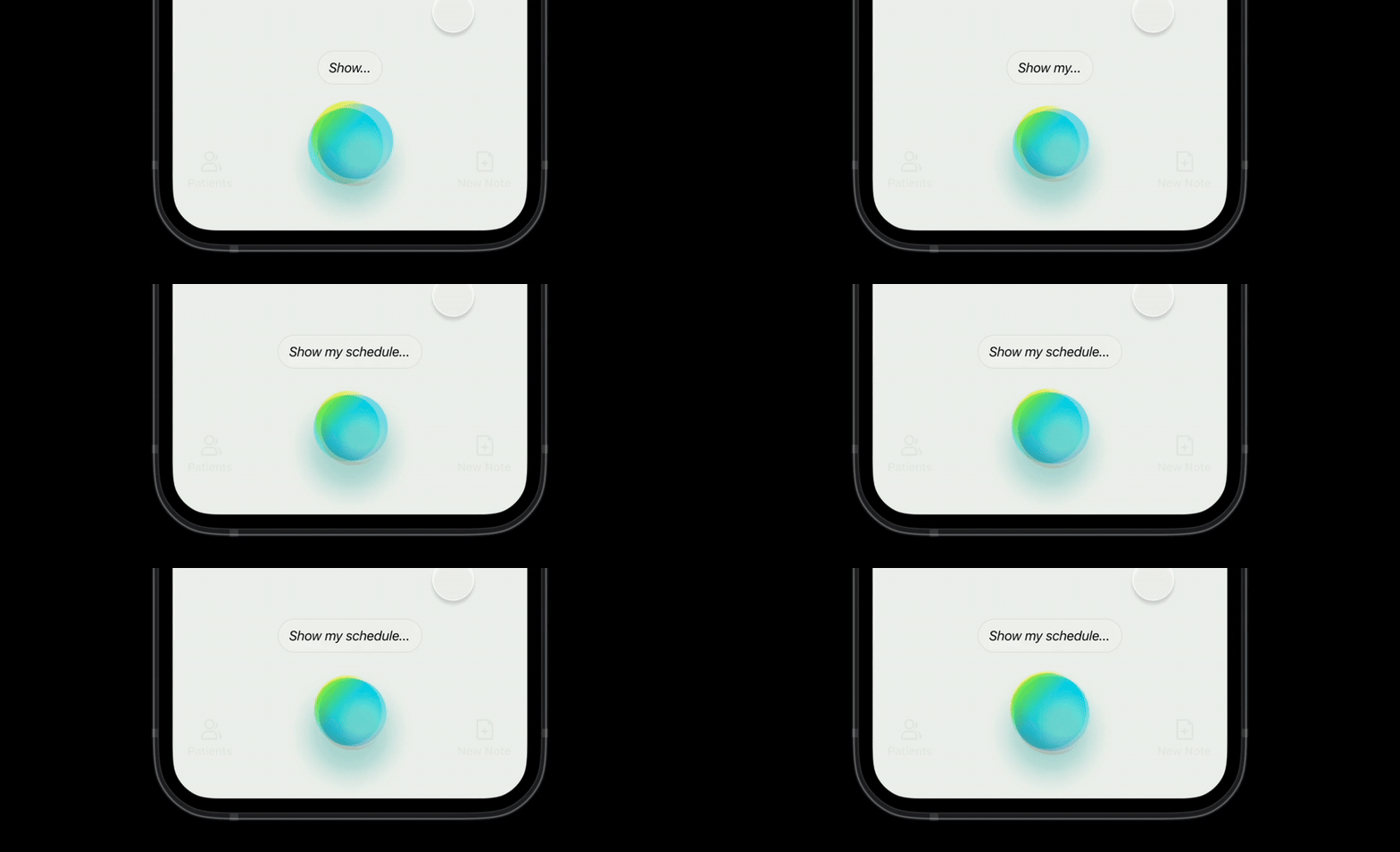
After reviewing with some trusted testers, Approach 4 was identified as the preferred direction to develop further. Alongside this, we aligned on expanding Suki’s textual feedback across multiple states, rather than limiting it to the processing state.
With unanimous agreement on introducing speech transcription to make the listening state clearer, I began refining, redesigning, and building upon this approach.
STEP 4
Improving Voice Discoverability
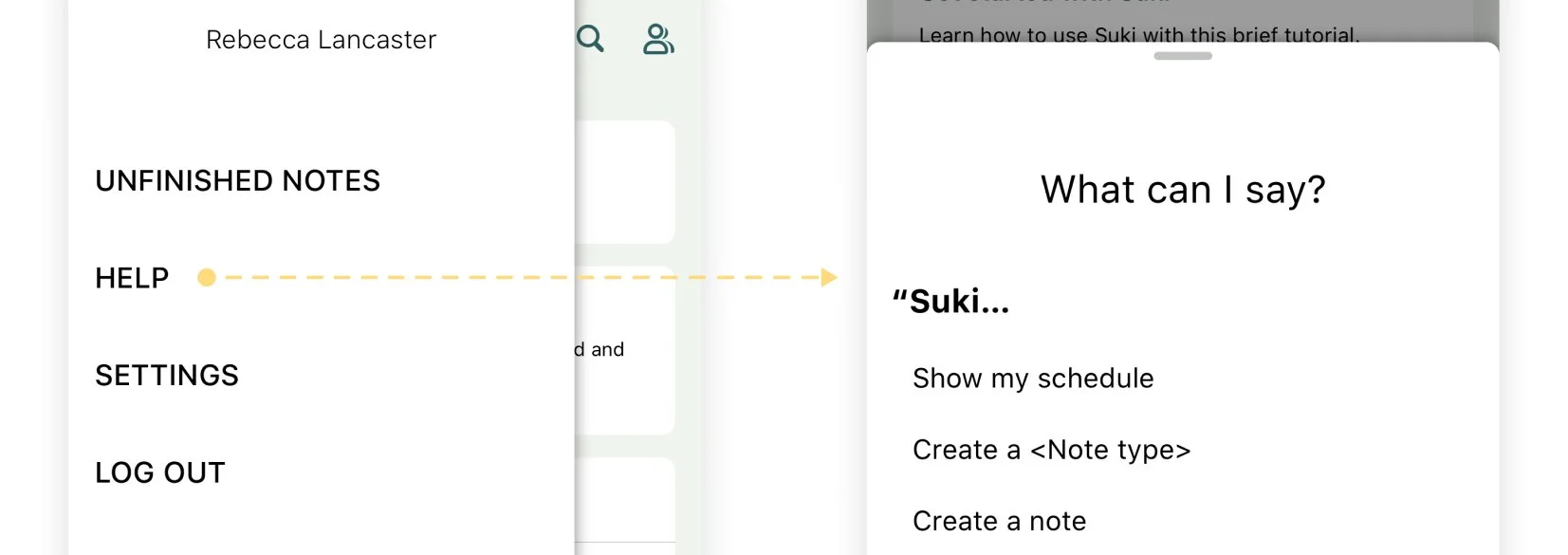
Another challenge we needed to address was the discoverability of voice commands. Suki has a modal listing all available commands, accessible through the “Suki, what can I say?” voice command or the Help Center in the hamburger menu. However, this approach still required users to remember the commands rather than discover them naturally during use.
DISPLAYING COMMANDS WHEN NEEDED
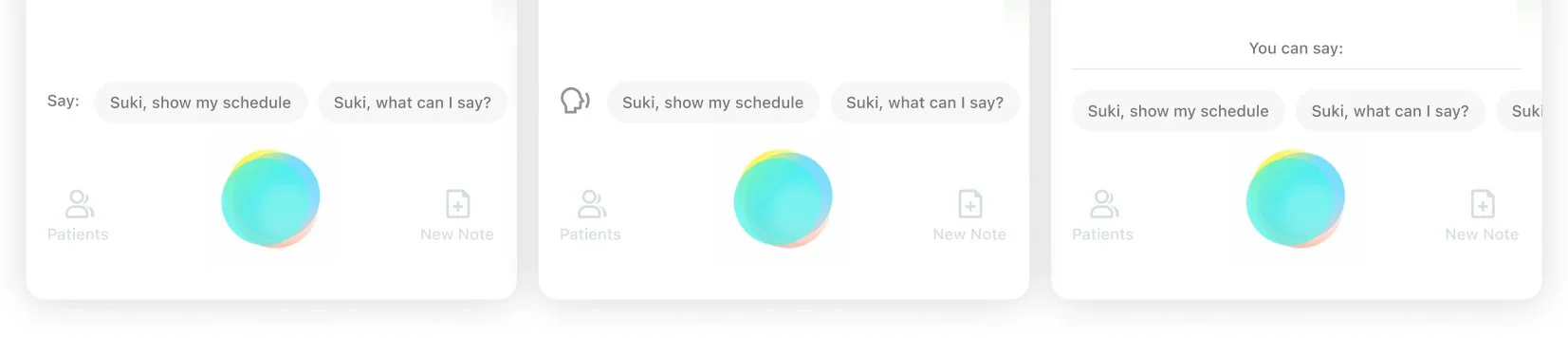
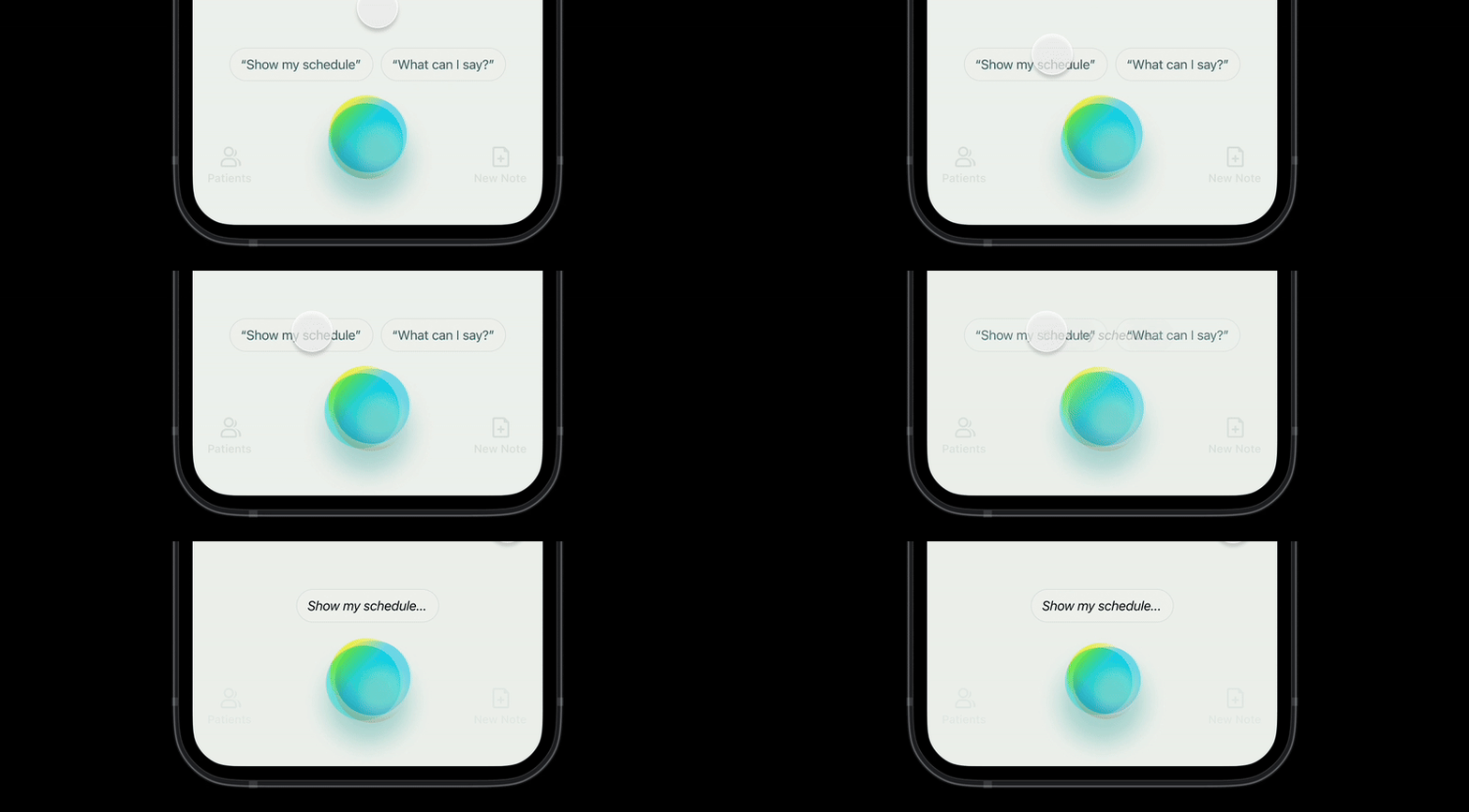
I decided to display voice commands at the moment users need them most, when they invoke Suki. Saying “Suki” clearly shows the user’s intent to issue a command, making it the ideal time to show what they can say next. This approach removes the need for users to remember commands altogether.
In my initial approach, I displayed voice command tips above the Suki badge to guide users on what they could say to Suki.
EDUCATION AND QUICK ACTION
In further explorations, I evolved the tips into tappable buttons, similar to suggested replies in a chat interface. This would allow users to simply tap a suggested command to perform the desired action. In this approach, tips served a dual purpose: educating users on available commands while also enabling quick action.

We also wanted to stay aligned with our primary goal of discoverability and education. For that reason, when a user taps a tip button, the command is first transcribed before being executed. This reinforces the idea that these tips are not merely quick actions, but voice commands the user can also say to Suki.
For the same reason, I designed the tip pills to visually mirror the transcription box. This visual consistency helps establish a clear connection, signaling that the tips represent spoken commands users can say to Suki.
CONTEXTUAL TIPS
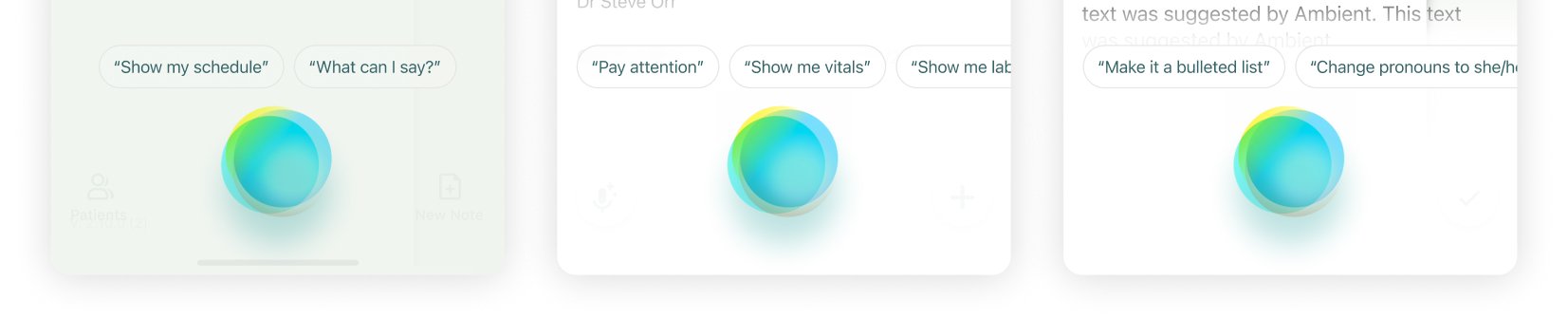
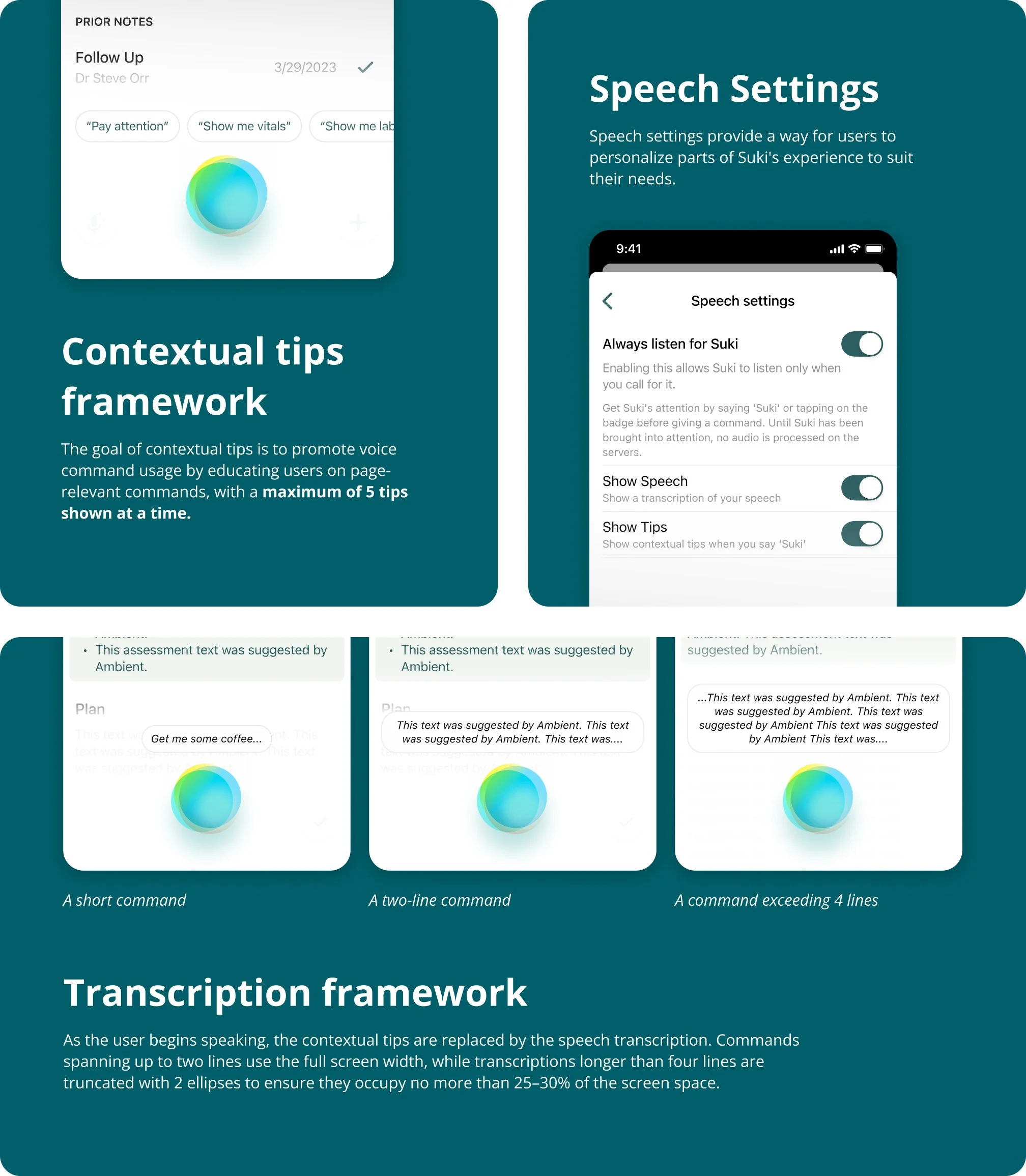
There was one limitation with this voice command tip framework. It allowed space for only five tips above the badge, which was not enough to showcase the full range of commands. To address this, we prioritized displaying tips that were contextual to the user’s current page or interaction state.

STEP 5
Pulling the final pieces together
With a clear direction established through explorations across modalities and voice discoverability, we brought everything together to create the final designs. This work spanned voice interactions across all scenarios and platforms, custom haptic design, and the underlying design frameworks.
Speech Experience Flow with LWWD (Mobile)
Walkthrough: Web App Experience
Speech Experience Flow without LWWD (Web, Extension)
Designing Haptic Feedback
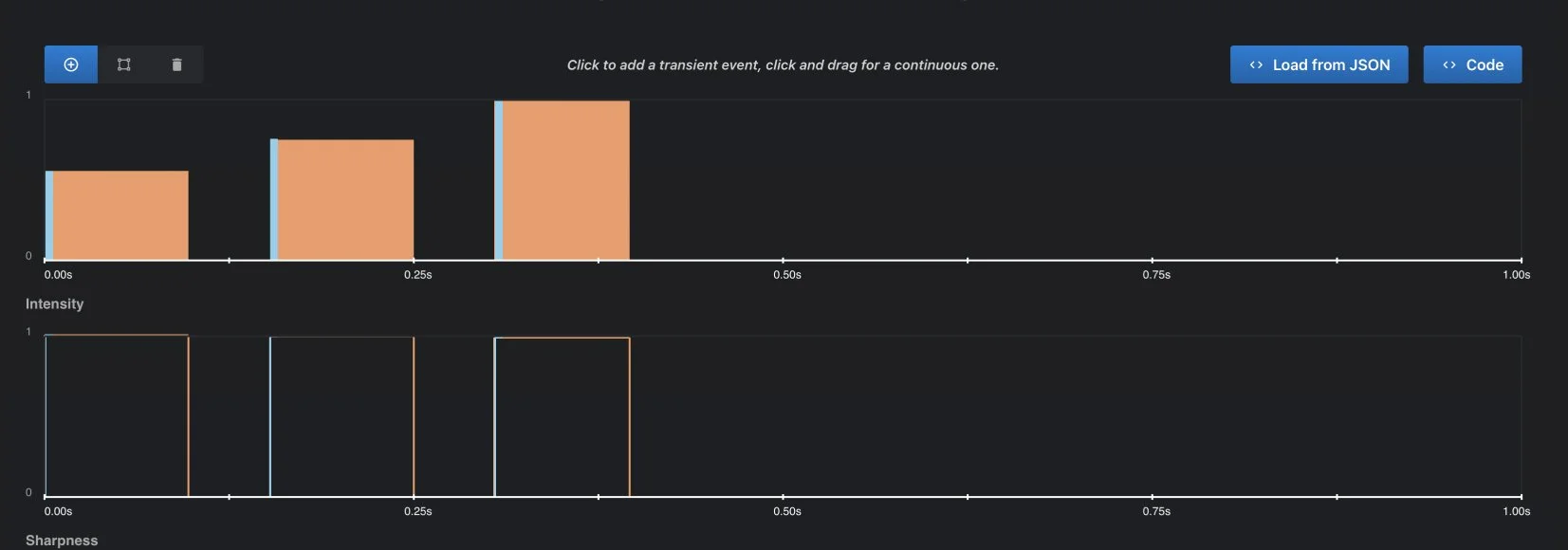
For the error state, I designed a custom haptic experience using Captain AHAP, to fully synchronize it with the error sound and motion to create a more noticeable and cohesive feedback experience. For other interaction states, the default platform haptics were used as they perfectly matched the sound and motion.
Sharpness
The haptic primitives were kept on the sharper end of the scale to create a crisp and distinct tactile response.
Timing
A 50 ms delay was kept between each of the three haptic primitives to maintain separation and clarity.
Intensity
To match the alerting nature of the error sound and for better perception of intensity differences, the primitives were designed with a gradual increase in intensity, progressing from 0.5 to 0.75 to 1.0.
STEP 6
User Research

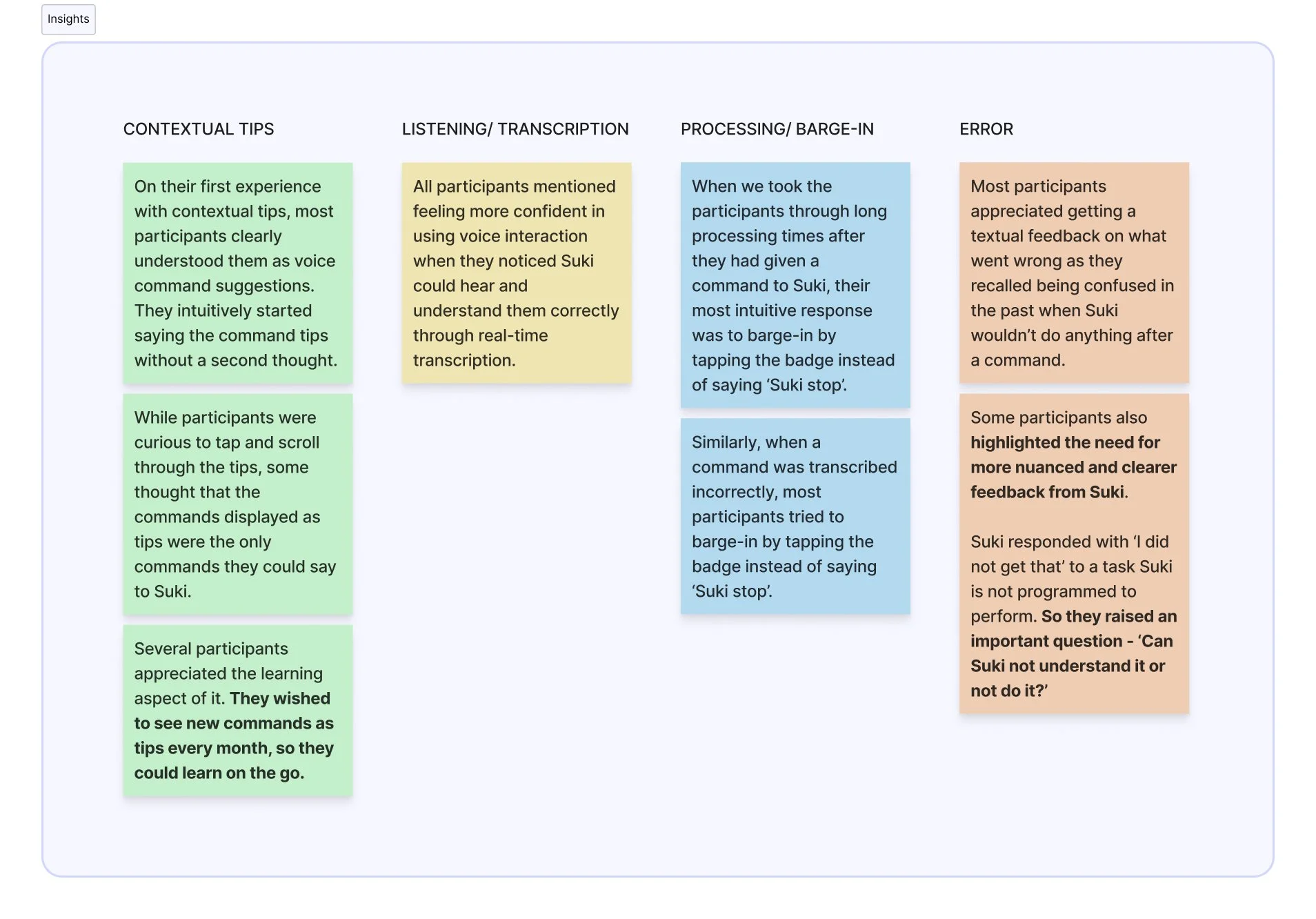
We conducted user research with trusted testers to evaluate the effectiveness of the new speech experience across visual, auditory, and haptic parameters, and to gather feedback to inform future fixes and improvements. Participants were asked to complete 5 tasks using a Wizard of Oz setup. They physically controlled all tapping interactions, while I remotely simulated system responses to their voice commands using my keyboard.
#1 Wake Suki up
Through this task, I wanted to see whether users attempt to wake Suki by tapping or using voice, whether they notice or feel curious about the command tips, and how they interact with them (by speaking the suggested commands, tapping them, or ignoring them altogether). I also wanted to understand the impact of contextual tips on improving the discoverability and use of voice interactions.
#2 Ask Suki to ’Make Assessment into bullets’ & ‘Delete History section’
This task explored how users feel about Suki listening to them and accurately transcribing their words. It examined whether users felt excited, amused, happy, or reassured, and assessed the effectiveness and perceived value of showing live transcriptions while a user is speaking a command.
#3 Ask Suki to ’Translate note to Spanish’
#4 Ask Suki to ’Make History into bullets’
With these two tasks, the focus was understanding users’ immediate reactions when something goes wrong, such as Suki transcribing speech incorrectly. This looked at whether users felt anxious, what actions they took to fix it or to stop Suki. I also wanted to guage whether stopping Suki by pressing the badge or saying “Suki, stop” felt more intuitive to them.
#5 Ask Suki to ’Get me some coffee’
This task examined how users respond to error states when Suki does not understand a command or fails to perform an action. I wanted to understand whether users felt confused, frustrated, or informed, and whether they chose to repeat the command, adjust their input, or abandon the interaction.
Insights & Feedback
After completing the tasks, we asked participants a series of follow-up questions about their experience with the new speech interaction. These questions focused on their overall impressions, whether they felt confused at any point, how clearly they understood Suki throughout the experience, their thoughts on live transcriptions, and whether completing the tasks helped them learn or discover new commands.
The insights below summarize what we observed as participants performed the tasks, what they said during the tasks, and how they responded to the follow-up questions.
Impact
Over the course of a month after the new speech experience was released, we tracked voice command usage and interactions on mobile across the following metrics:
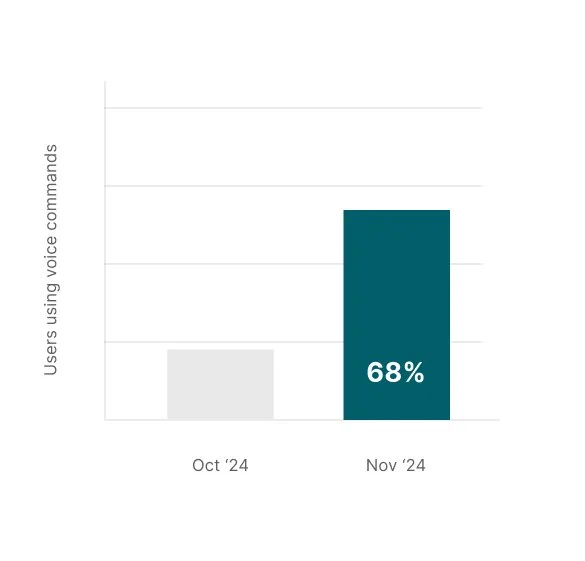
Growth in the number of users using voice commands.
The number of users using voice commands rose from 22 percent before the launch to 68 percent a month after the launch.
(A user is considered to be using commands if they say a command at least once)
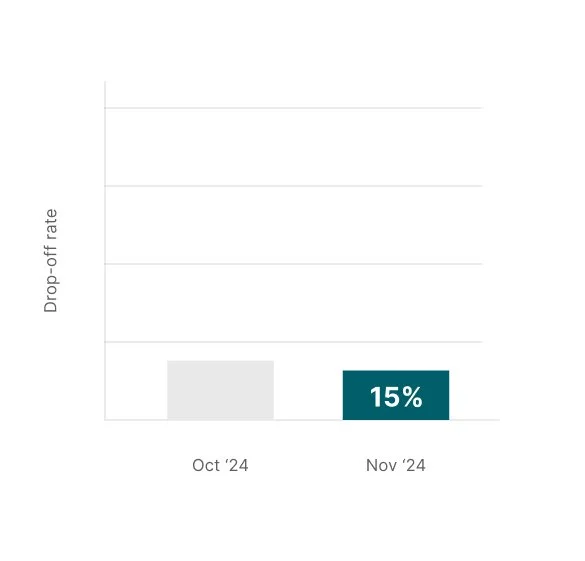
Reduction in drop-off rate during voice interactions.
The drop-off rate reduced slightly to under 15 percent which was previously at 18 percent.
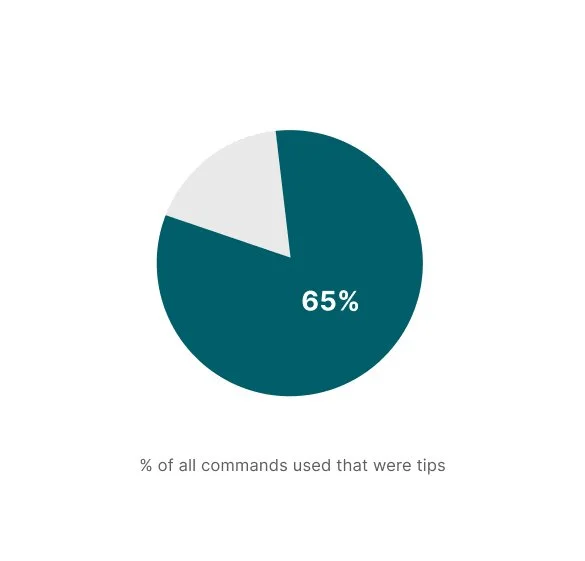
Command tips account for >30% of all voice commands used.
Around 65% of the commands used were the suggested command tips, indicating that contextual tips are positively influencing voice interaction and discoverability, and helping users learn relevant commands. At the same time, only a small portion of users went beyond the suggested tips to try other commands.